No Captions on Your Research Video? Here's Exactly How to Get an Accurate Transcript Anyway (2026 Guide)
You track down the exact recording you need, a lecture, a source interview, a conference talk someone uploaded eighteen months ago.
You click into it, look for the transcript, and get nothing. No captions. No auto-generated subtitles.
If you're doing research, that's a major inconvenience. It's the difference between quoting a source accurately and paraphrasing from memory an hour after you watched something.
Here's what's actually going on when a video has no captions, what it costs you if you ignore it, and the options that work, ranked by accuracy, not marketing copy.
Why Research Videos Often Have No Captions in the First Place
It's not random. A video ends up caption-less for one of a few specific reasons:
- The uploader disabled captions, or never had auto-captions generate, common on smaller academic channels, university media offices, and single-upload conference recordings.
- The video is unlisted or privately shared (a Zoom interview recording, a research team's internal upload) and automatic captioning either wasn't triggered or was turned off.
- The platform's speech recognition never ran cleanly on it- auto-captioning systems are trained and tuned on a specific profile of audio, and a lot of research recordings don't match it.
That last point matters more than most guides mention. Automatic speech recognition (ASR) (the technology behind auto-captions) doesn't fail randomly. It fails predictably on certain conditions, and research recordings hit almost all of them at once:
- Single built-in laptop or phone mic, recorded at a distance
- Two or more speakers talking over each other
- Room echo, HVAC noise, or a lecture hall's natural reverb
- Accented or non-native English speech
- Domain-specific or technical vocabulary the model has rarely seen
Fact: OpenAI's own published benchmark for Whisper (one of the models underpinning much of today's auto-captioning and transcription software) shows a word error rate (WER) of about 2.7% on LibriSpeech, a clean, studio-quality audiobook benchmark.
But independent evaluations on real-world audio (meetings, podcasts, phone calls) put English WER closer to 8–12%, and that climbs further with accents or background noise (OpenAI Whisper; independent WER analysis).
In other words: the cleaner the audio, the better any auto-caption system performs, and most research recordings are exactly the kind of "messy" audio these systems struggle with.
What "No Captions" Actually Costs You
Two things, and only one of them is about time.
1. Hours you don't have. Manually transcribing audio typically takes 4–6x the recording's length for a careful, accurate transcript. A 60-minute interview is a half-day of work if you're doing it by hand and doing it properly.
2. Citation risk. If you're working from memory or rough notes instead of a searchable transcript, the risk isn't just inefficiency, it's misquoting a source. In qualitative research and journalism, the transcript is the evidentiary backbone of the work: it's what you go back to when you need to verify you got a quote right, in context, word for word. Skipping it doesn't save you time; it moves the risk to your citations page.
Your Options for Transcribing a Caption-less Video (Ranked)
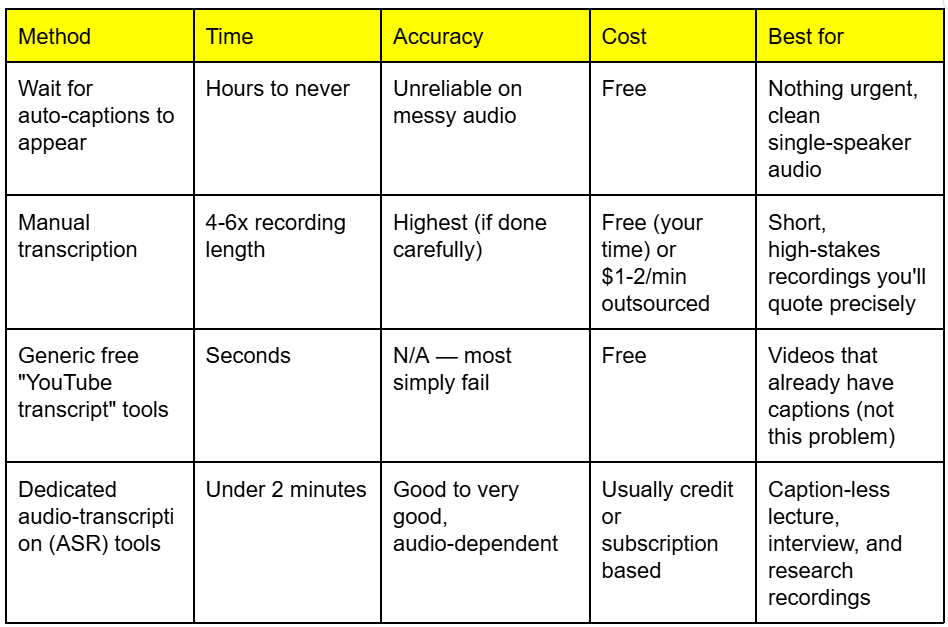
Here's the part most "how to get a YouTube transcript" articles skip entirely: when a video has no caption track, tools that only read YouTube's existing captions come up completely empty.
It's not that they're bad at their job — reading captions that don't exist isn't a job any tool can do.
You need something that transcribes the audio itself, from scratch, using ASR.
That's a fundamentally different (and more computationally expensive) process, which is why it's usually the paid or credit-metered tier of a transcription tool rather than the free instant-copy option.
Yt2text.online vs. Others (For the Data-Curious)
If you're comparing transcription tools, you'll eventually notice they're not all built on the same underlying speech model, and it's a reasonable thing to ask about, because it does affect your output.
On clean, studio-quality audio, they're all the same. On the messier, real-world audio that describes most research recordings, independent benchmark compilations show a modest but consistent gap:
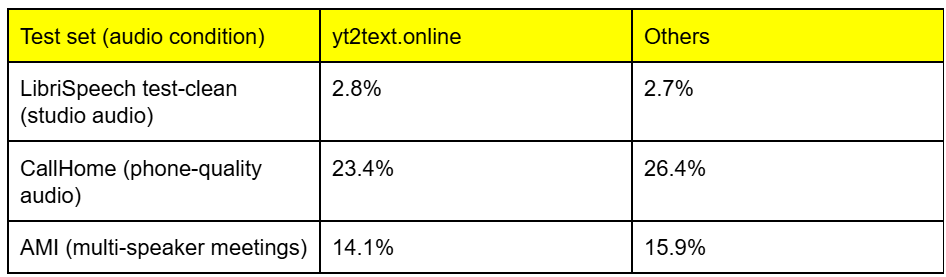
(Word error rate — lower is better. Figures compiled from published benchmarks by VexaScribe's model comparison; AssemblyAI's own published figures for its newer Universal-3 Pro model claim a further improvement to roughly 5.6% mean WER across a broader real-world dataset mix, per AssemblyAI's benchmark page.)
Two honest caveats worth stating outright: vendor-published benchmarks tend to use favorable test conditions, and independent analysts have pointed out that "word error rate on clean English audio has plateaued," with top providers sitting within 1–2 percentage points of each other. The real differentiator shows up specifically on noisy, multi-speaker, accented audio, which is, not coincidentally, exactly what a raw lecture or interview recording usually is.
The other practical difference: yt2text.online AI models include built-in speaker diarization, automatically labelling "Speaker A" and "Speaker B" in a multi-person recording.
If you're transcribing an interview or panel discussion and need to know who said what, you can’t solely rely on memory from a video.
Having a text transcribed from your desired YouTube video is proof of your work.
It’s more useful when your desired video has no auto-generated captions or inaccurate captions.
yt2text's audio-transcription fallback is built on AI models, for what it's worth if you're choosing between tools on this basis specifically.
To be fair to the category: audio-fallback transcription for caption-less video isn't unique to any single tool anymore. Several transcription tools now offer some version of it.
The model behind it, and how it performs on your specific audio, is the part actually worth comparing. You can refer to the table above just incase.
Step-by-Step: Getting an Accurate Transcript in Under 2 Minutes
- Copy the video's URL - public, unlisted, or private-but-shared links all work the same way for this step.
- Paste it into a transcription tool that supports audio-fallback transcription (not just caption-reading). This is the step generic "free transcript" tools skip - check specifically that the tool mentions transcribing from audio, not just pulling existing captions.
- Let it process. Audio transcription takes longer than caption-reading (it's doing real speech recognition, not just copying text), but for most recordings under an hour, this is a couple of minutes, not a coffee break.
- Export and spot-check. Skim the first and last few minutes against the actual audio before you trust the whole thing - see the next section for why.
If you want to test this on one of your own recordings, yt2text.online 7-day free trial includes 20 credits with no credit card required - enough to try the exact workflow on a short lecture or interview clip before deciding whether it's worth paying for at volume.
Before You Cite It: How to Verify an Auto-Generated Transcript
An auto-transcript is a first draft, not a finished citation. Before you quote directly from one:
- Spot-check against the audio at a few random points, especially anywhere technical terminology, names, or numbers appear. These are where ASR models are most likely to guess wrong.
- Watch for confidently wrong homophones ("there/their," similar-sounding names, acronyms). The transcript will read fluently even when it's wrong, which is exactly what makes it dangerous to trust blindly.
- Re-verify anything you plan to quote directly, word for word, against the original recording. Treat the transcript as a navigation tool to find the moment, not as the citable source itself.
FAQ
Can auto-generated transcripts be trusted for academic citations?
As a starting point, yes. As the final word, no. Use the transcript to locate and navigate the recording, then verify the exact wording of anything you'll quote directly against the original audio.
How do I transcribe a private or unlisted video with no captions?
Audio-fallback transcription tools generally work the same way regardless of a video's visibility setting, as long as you have a working link to it - the tool needs access to the audio track, not YouTube's caption system.
What's the fastest way to transcribe a 90-minute lecture recording?
An ASR-based tool with audio fallback, typically a few minutes of processing versus 6-9 hours of manual transcription at a careful pace.